





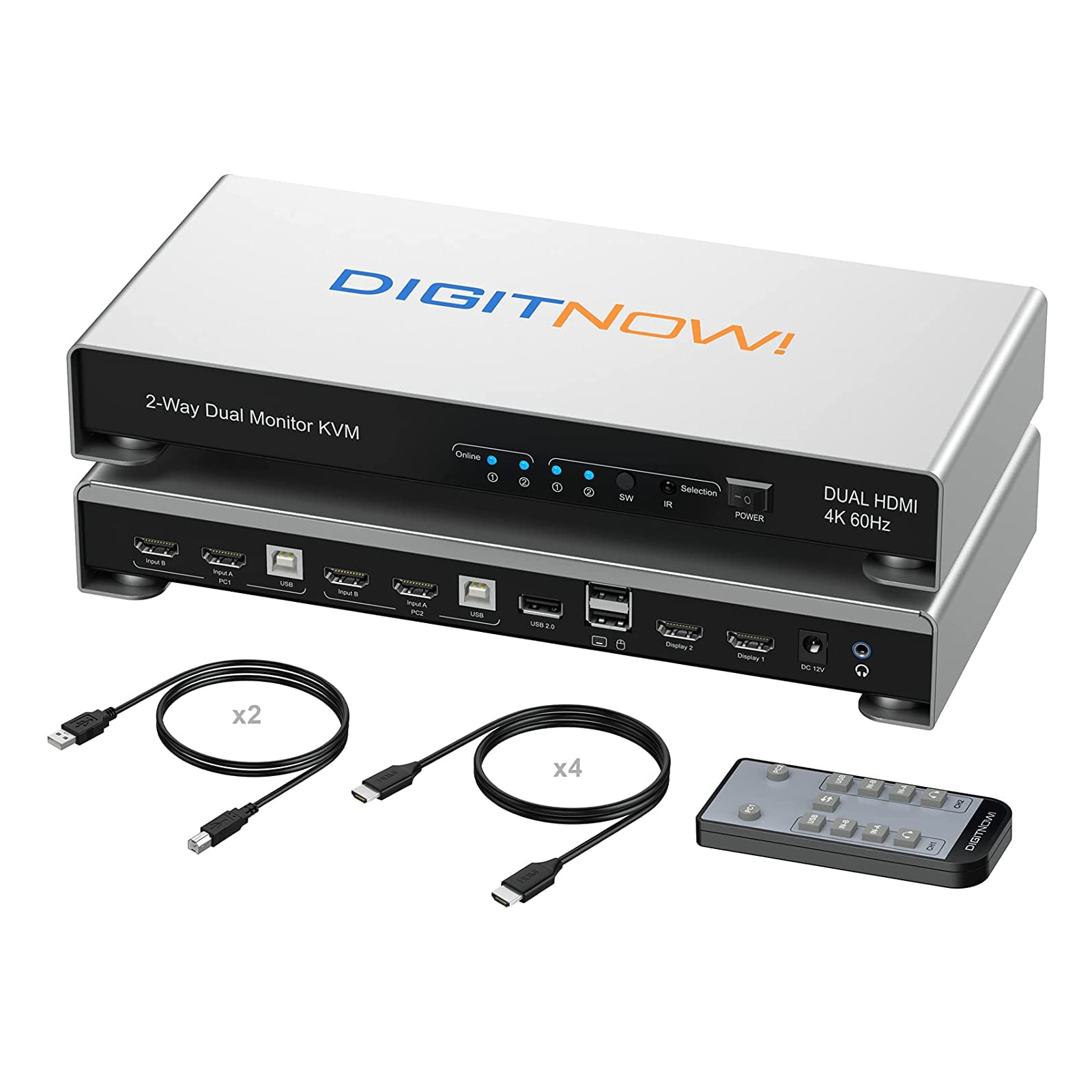


Summary: KVM Switch 2 Monitors 2 Computers, UHD 4K@60Hz KVM Switch HDMI 2 Port, Extended Display KVM Switches with 3 USB Ports, L/R Audio, Remote & Hotkey & Button Switching PC, Support EDID

You might looking for Dual Monitor KVM Switch with following features:
Console and control up to 2 computers or laptops with one set of keyboard and mouse and 2 monitors. helps to reduce equipment spending and make a tidy and efficient work space;
Support 3 switching methods (front panel switch buttons, remote control, keyboard hotkey) to control this Dual Monitor HDMI KVM switches;
Support L/R Audio output,Monitor KVM switch comes with 3.5mm Audio Jack ports with a DAC chip inside, which can be inserted into a 3-segment 3.5mm earpiece device.
Compatible to most major OS including Windows, Linux and Mac etc. Not require any software or drivers,plug and play.
Supports multiple keyboards and mouse, such as wired, wireless, mechanical, multimedia, and gaming keyboards and mouse.
HDMI 2.0 supports 4K (3840 x 2160 @ 60hz) resolution. downward compatible. If monitor is not displaying properly, try reduce resolution.
With all cables needed except monitor cables.
Attention:
Remote control need to take off the plastic film on the battery before using it;
Compatibility with Win 7: Due to the slow loading of Win 7 driver, please wait patiently when connecting to Win 7 for the first time until the USB driver is loaded.
Our engineers tested that Win7 and Win10 may not support EDID functions, if you have these version of computers, please confirm first.
How to make sure your computers support EDID function:
Please use an HDMI cable to reconnect the monitor, the icons are sorted by one side, which does not support EDID.
|
|
|
|---|---|---|
Universal K&M CompatibilityDual monitor KVM Switch is suitable for most keyboards and mice on the market. KVM Switch 2 monitors 2 computers supports wired, wireless, mechanical, multimedia, and gaming keyboard and mouse.(Wireless bluetooth keyboard and mouse could not support). | Standard USB 2.0 PortKVM Switch 2 monitors 2 computers with Standard USB 2.0 port works with scanner, U disk, USB driver, 3D printer, webcam, hard disk, usb hub, camera, barcode scanner.Meet more demands at work. | 3 Convenient Switch Modes
Allow you to quickly switch to the mode you need anytime and anywhere during the work, improve your work efficiency. Please read the manual before switching the KVM switch mode. |


|
|
|
|---|---|---|
IR Remote ControlIR Remote Control make switching easier,it takes 1-2 seconds to switch between devices, and there is no discernable lag. The best KVM switch to keep your workspace tidy makes your life simpler and more efficient, and also a great home office setup. | Audio OutputKVM Switch comes with a 3.5mm Audio Jack port with a DAC chip inside, which can be inserted into a 3-segment 3.5mm earpiece device. | What's the the box1.Dual Monitor KVM Switch X1 2.Remote control X1 3.DC Power Adapter X1 4.HDMI Cables X4 5.USB-B Cables X2 6.User Manual X 1 |


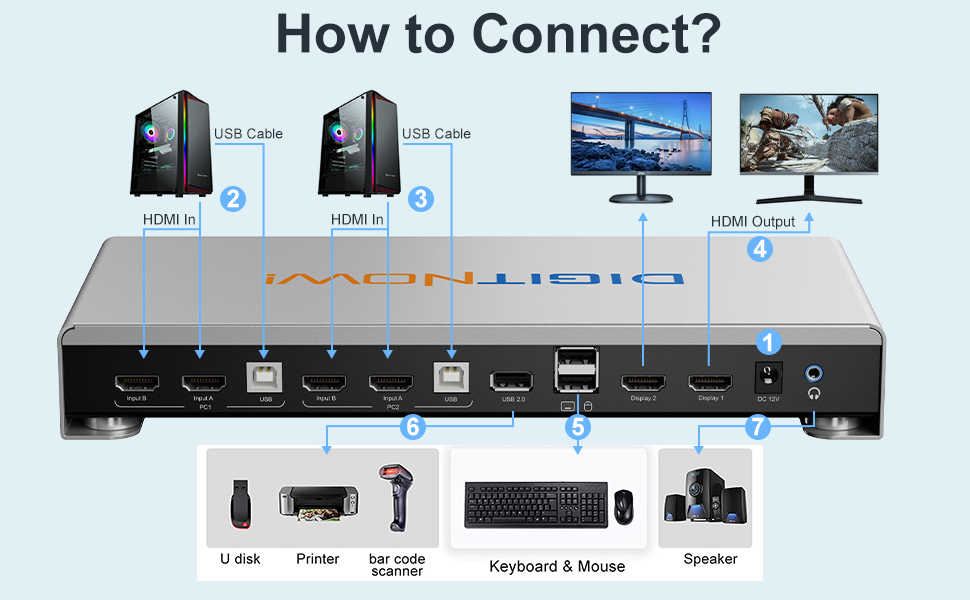
How to connect the USB cables with KVM switch HDMI:
1. Each computer and KVM switches PC1 and PC2 must connect 2 HDMI cables and 1 USB cable (cables are includes in the package) to ensure keyboard, mouse and monitor to work correctly.
Note: Please make sure the cables connect well;
2. Connect monitor to the KVM;
3. Connect keyboard/mouse and other USB 2.0 devices to the specific port;
4. Plug the power and turn on the switch.
The Advantages Of Our Dual Monitor KVM Switch

SPECIFICATIONS
Video Signal: HDM: HDMI with 4K@60Hz, HDCP 2.2
Input/Output Resolution: 1024×768@60Hz, 1280x720P@60Hz, 1280×768@60Hz, 1280×800@60Hz, 1280×960@60Hz, 1280×1024@60Hz, 1360×768@60Hz, 920x1080P@60Hz, 1366×768@60Hz, 1400×1050@60Hz, 1440×900@60Hz, 1600×900@60Hz, 1600×1200@60Hz, 1680×1050@60Hz, 1920x1080P@240Hz, 1920x1080@165Hz, 1920x1080@144Hz, 1920×1200@60Hz, 2560×1440@144Hz, 2560×1440@120Hz, 2560×1080@120Hz, 3840×1080@120Hz, 3840×2160@60Hz, 4096×2160@60Hz
Audio Format Supported: Stereo, PCM 2.0/5.1, Dolby Audio, etc,.
Power Consumption (Maximum): 12W
Device Dimensions (W x H x D): 283 x 135 x 60mm/11.14’’ x 5.31’’ x 2.36’’
Product Weight: 580g/1.27lbs
